
Forgejo v15.0 is available
Forgejo v15.0, the lightweight, community-developed, self-hosted platform for code collaboration, was released on 16 April 2026. It marks the 100th release of Forgejo. You will find a short selection of the changes it introduces below and a complete list in the release notes.
A dedicated test instance is available to try it out. Before upgrading, it is strongly recommended to make a full backup as explained in the upgrade guide and carefully read all breaking changes from the release notes. If you upgrade from v11.0, please remember to also check the release notes for v12.0, v13.0, and v14.0 for breaking changes. If in doubt, do not hesitate to ask for help in the chat room.
Summary
Forgejo v15.0 refines areas of day-to-day usability and security, and incorporates new capabilities in advanced Forgejo Actions usage.
UI enhancements in issue filtering and the releases list make Forgejo easier to interact with. Auto-linking containers to repositories removes a manual step from repository administrators. Git notes can now be modified from the single-commit view in pull requests.
Repository specific access tokens allow for more secure API interactions.
Forgejo Actions can now expand reusable workflows, providing a better user experience and more powerful capabilities. OpenID Connect support allows for secure access to third-party systems. Forgejo Runner registration improvements allow a simpler installation process for most users, and ephemeral runners allow secure autoscaling capabilities for advanced integrations.
Breaking change
Default cookie names changed
Default cookie names have been stripped of branding. Unless cookies were renamed in the instance config, all users will have to re-login after upgrade. This can be prevented by changing the option COOKIE_REMEMBER_NAME back to gitea_incredible.
Docker rootless config file location
In Forgejo v8.0.0, the default location for the config file was changed from /etc/gitea/app.ini to /var/lib/gitea/custom/conf/app.ini. Backward compatibility logic and startup warnings were added to container setup and entrypoint scripts. Now they are removed. This change only affects those using container deployments with rootless images. If you have the config file stored in a volume bound to container’s /etc/gitea, move it to the new location or override the environment variable GITEA_APP_INI. An unused volume /etc/gitea can be safely removed from the container after moving the config or if the deployment never used versions prior to v8.0.0.
New features
Repository specific access tokens
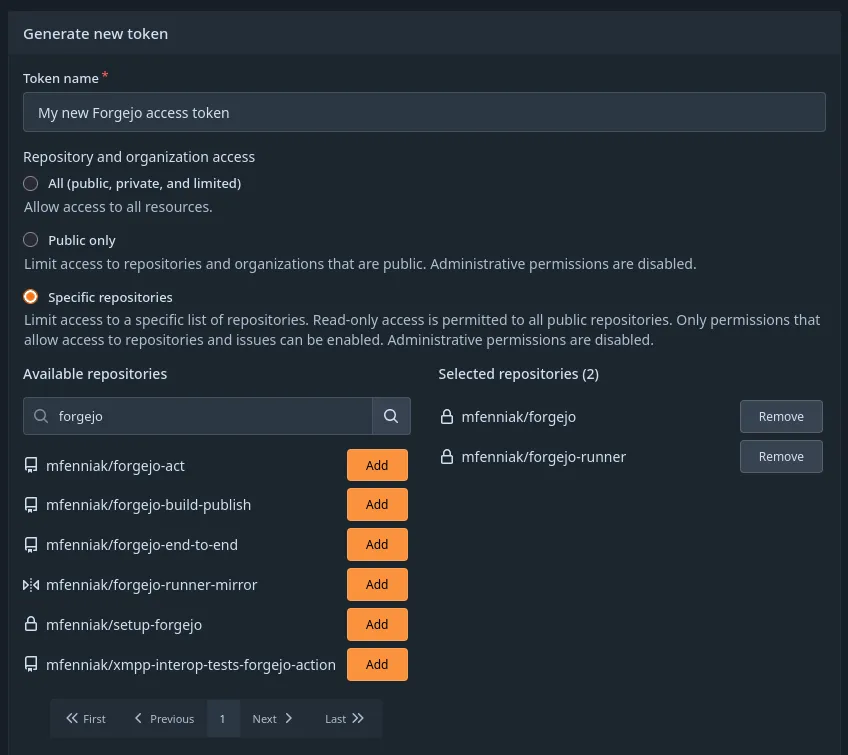
When creating an access token, it is now possible to restrict the new access token to a specific list of repositories. The access token will not be able to perform operations on any resources outside of this list, except for read-only access to public repositories. For more detailed information, review the updated Access Token Scope documentation.
Authorization changes were made to many Forgejo repository APIs to align the expectations of the new access tokens and the existing public only access tokens with the designed security expectations. Changes to the behaviour of public only tokens were included during this alignment, which have been documented as breaking changes in the Forgejo release notes.
Auto-linking containers
When uploading a container via Forgejo’s package registry, it is now automatically linked to a repository in the following scenarios:
- The container has the
org.opencontainers.image.sourcelabel set to a URL of a repository. - The name of the container begins with
{owner}/{repo}.
Improved error messages
If an access token that doesn’t exist in Forgejo’s database is supplied via OAuth2, the error now explicitly tells that such token doesn’t exist. Previously it would yield a generic error that the user doesn’t exist.
When pushing to a repository without write permission, git push now returns a more detailed message: Who was pushing (helpful if you pushed with the wrong key or token), to which repository and branch (maybe the remote was wrong), and instructions on how to create a PR via AGit workflow.
Sessions only for logged-in users
If you’ve ever wanted to distinguish between logged-in and anonymous users at a reverse proxy or web application firewall, you’ve likely found that it’s not possible. Previously, every anonymous user received a session cookie, even when no data was attached to the session.
This situation was improved by setting a session cookie only when data needs to be set, either because the user is logged in or because they are going through the sign-in process. Validating that the cookie has been set by Forgejo and is valid is enough to distinguish between anonymous and logged-in users.
UI features
Exclude labels with button
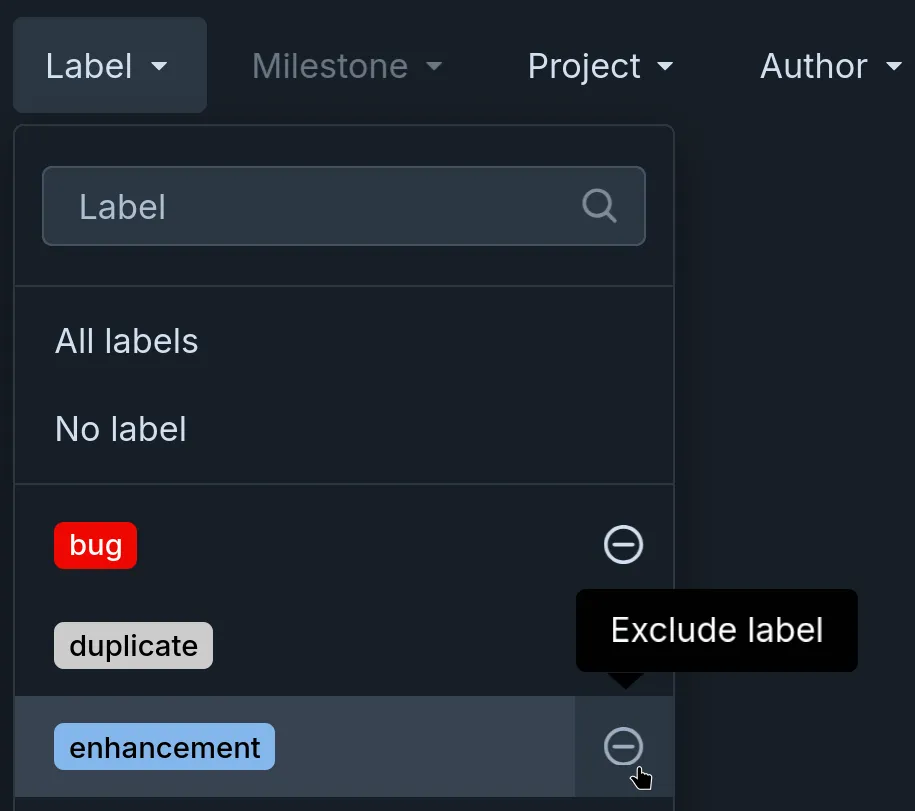
The way of excluding labels in the filters menu has been reworked. Pressing the Alt key on the keyboard is no longer needed, a button can now be used, making the feature possible to use without a keyboard. The buttons are always visible when it’s not possible to hover, e.g. when using a touch screen.
Responsive releases list
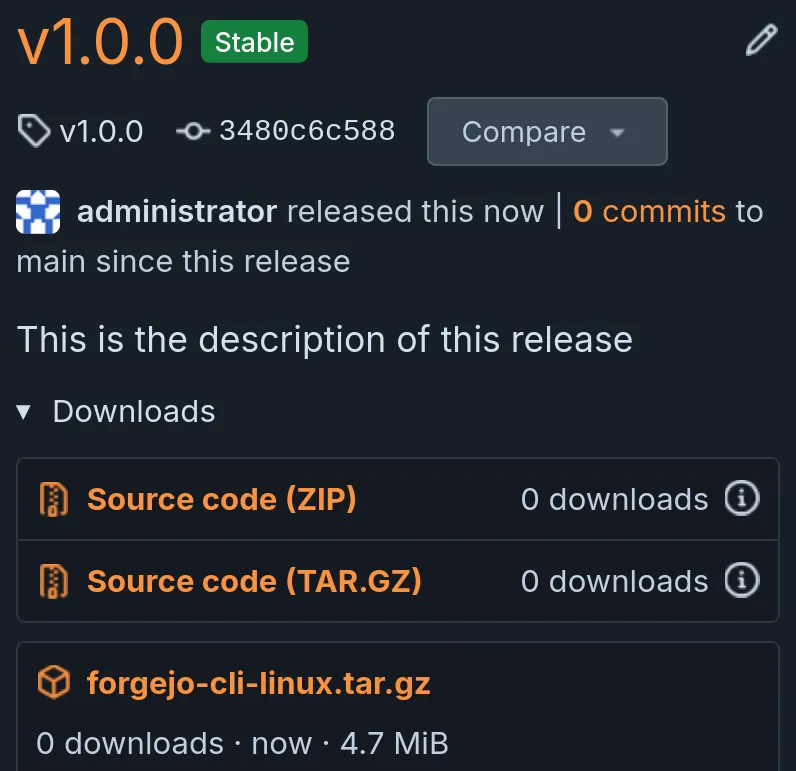
Releases page has been reworked to be usable on screens of all kinds of shapes.
Improved Git notes editing
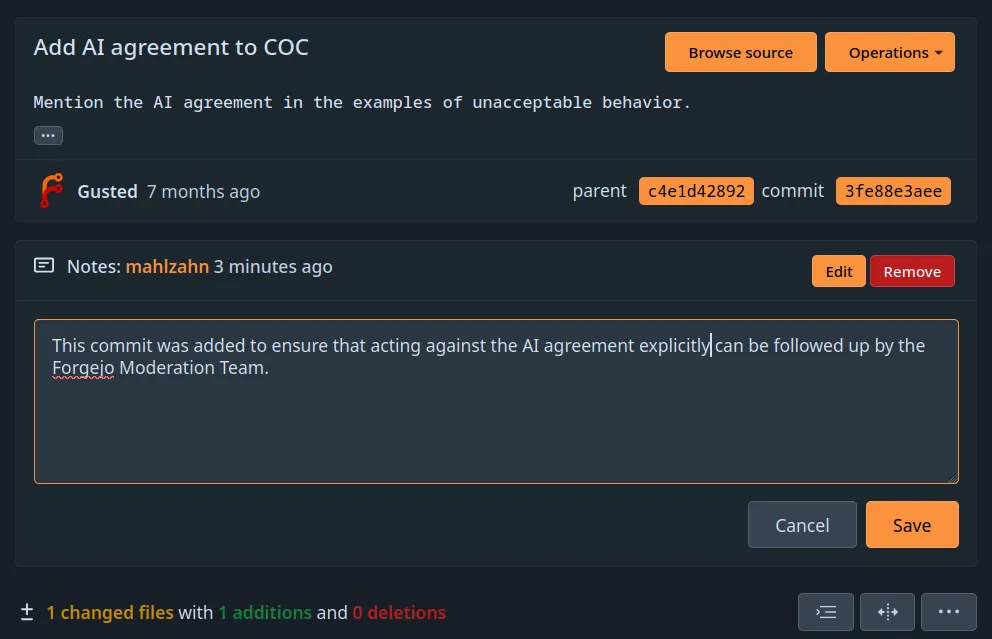
Git notes can be attached to commits. The addition, editing and removal of notes was improved. Editing can now be cancelled within the UI. Additionally, notes can now be modified from the single-commit view in pull requests.
Please document your archival
Although Forgejo will not require you to provide an archival reason when archiving a repository, it now suggests that you do so when applicable.
Accessibility improvements
There have been numerous improvements to screen reader usability in this release. Although they are not visible when looking at Forgejo’s UI, they are very important for accessibility to visually impaired people.
Forgejo Actions improvements
Reusable workflow expansion
Reusable workflows are a capability of Forgejo Actions that is often used to replicate a common CI job across multiple repositories, allowing one workflow to include another workflow. For example, this workflow will actually run a different workflow from another repository:
jobs:
  caller:
    uses: my-org/workflow-library/.forgejo/workflows/reusable.yml@main
Since this capability was implemented, it has been limited: the runs-on field was required preventing the target workflow from having multiple jobs with different runners, and all of the logs from the target workflow would be displayed in the UI as a single “Set up job” log entry. This made the capability functional for some cases but difficult to use, and unable to meet some more complex needs at all.
Forgejo v15.0 includes a significant rework in order to make these workflows more usable, and function more inline with user’s expectations. When the top-level runs-on field is removed, the workflows referenced by uses will be expanded by Forgejo into their internal jobs and dispatched independently.
This separation of each individual job allows their logs to appear separately in the Forgejo Actions logs UI, making for a more easy-to-understand experience when reviewing the logs.
Expansion into individual jobs allows multiple runners to pick up each job, potentially with different labels, or running on different system configurations or platforms.
OpenID Connect Identity
It is very common for Forgejo Actions workflows to authenticate with 3rd-party systems for validation or deployment of software changes. Up to Forgejo v14.0, the typical solution is to create secrets in Forgejo that contain authentication tokens for these systems. This solution works, but it has security downsides — notably, an attacker who is capable of stealing those tokens has tokens that may last forever. Good security practices would include rotating these tokens from time-to-time to minimize the risk, but such practices are not as common as they should be.
OpenID Connect tokens offer an alternative federated identity option which, if supported by a 3rd-party system, avoids the security risks of static, unchanging tokens. With this system, an action workflow asks Forgejo for a signed JWT, Forgejo provides it, and the external system can authenticate that incoming service calls originate from a Forgejo workflow with specific claims. Unlike the static security token approach, the trust relationship is server-to-server and any intercepted, leaked, or exfiltrated tokens have a short applicability lifetime.
With changes to both the Forgejo Runner (>v12.5.0) and Forgejo (in v15.0), Forgejo Actions will support this capability as well. Detailed documentation is available to review the system architecture and support users in implementing this capability.
Ephemeral Runners
Forgejo now supports registering runners that are restricted to running a single job. Their registration with Forgejo is deleted after the job is completed, preventing the runner’s credentials from being re-used. This feature allows external orchestration tools for runner autoscaling to minimize their security risks by generating temporary credentials for each job being dispatched to a runner in an orchestrated fleet.
For example, a runner can be registered through Forgejo’s API:
$ curl -X 'POST' \
  'https://example.com/api/v1/admin/actions/runners' \
  -H 'accept: application/json' \
  -H 'Authorization: Bearer 4f28dd097f2aa4776daa71599dee1b215be84d19' \
  -H 'Content-Type: application/json' \
  -d '{
  "name": "example runner",
  "ephemeral": true
}'

{
  "id":31,
  "uuid":"392c9434-6bb9-454b-b9ff-646875cf6691",
  "token":"09d130cf90f9d757d83e5cc5a5338c470f04b71c"
}
And then using Forgejo Runner’s one-job command, a single job will be fetched and invoked by the runner:
$ echo -n "09d130cf90f9d757d83e5cc5a5338c470f04b71c" > /tmp/secret-token.txt

$ ./forgejo-runner one-job \
    --url https://example.com \
    --uuid 392c9434-6bb9-454b-b9ff-646875cf6691 \
    --token-url file:///tmp/secret-token.txt \
    --label debian:docker://node:current-trixie \
    --wait

INFO[0000] No configuration file specified; using default settings.
INFO[2026-04-03T15:45:10-06:00] Starting job
INFO[2026-04-03T15:45:10-06:00] runner: example runner, with version: v12.8.0, with labels: [debian], ephemeral: true, declared successfully
INFO[2026-04-03T15:45:10-06:00] single task poller launched
... (logs omitted) ...
After the job is fetched and completed, the runner’s credentials are invalidated.
Simplified Runner registration
Forgejo v15.0 contains a new registration workflow for Forgejo Runner which has a simple web experience. Rather than running a CLI registration tool on the Forgejo Runner, which can be an tricky step to manage when within a Docker container, it is now possible to create a runner through Forgejo’s web UI (and web API):
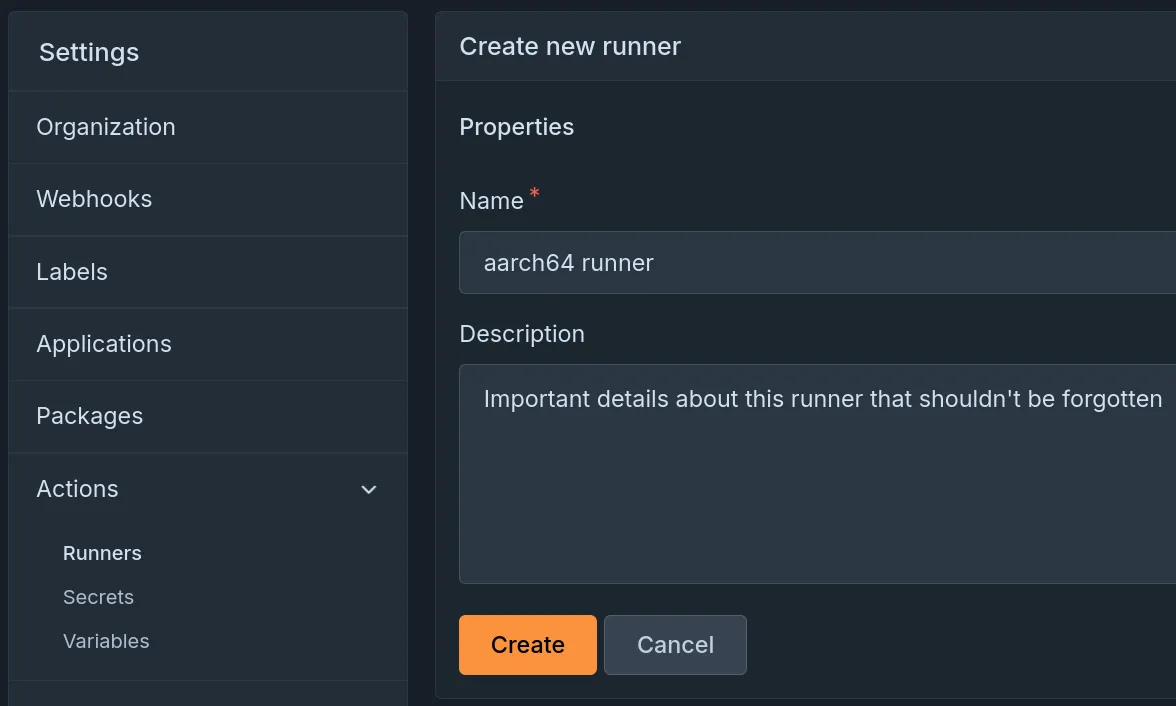
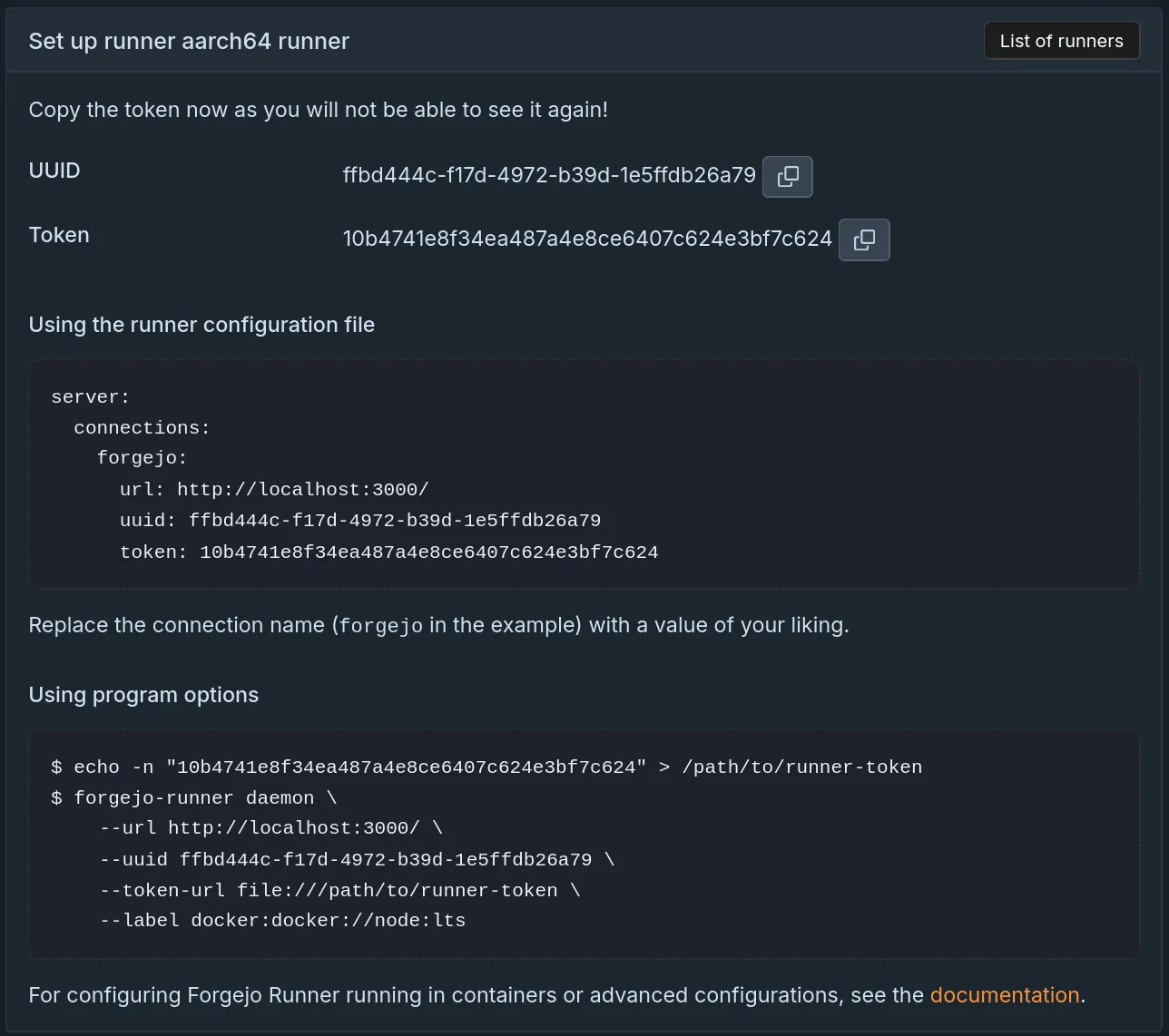
And then copy a few settings into the Forgejo Runner configuration file and start-up the Forgejo Runner.
Forgejo Runner’s installation documentation has been refreshed with the new updates, and detailed documentation on the interactive registration process is available.
Release schedule and Long Term Support
Based on the release schedule, major releases are published every three months. Patch releases are published more frequently, depending on the severity of the bug or security fixes they contain. Forgejo v15.0 is a Long Term Support (LTS) release and will be supported until 15 July 2027.
Forgejo v11.0, the previous LTS release, will be supported until 16 July 2026, giving everyone enough time to upgrade to Forgejo v15.0. If you upgrade from v11.0, please remember to also check the release notes for v12.0, v13.0, and v14.0 for breaking changes.
| Version | Release date | End Of Life |
|---|---|---|
| 11.0 (LTS) | 16 April 2025 | 16 July 2026 |
| 14.0 | 15 January 2026 | 30 April 2026 |
| 15.0 (LTS) | 16 April 2026 | 15 July 2027 |
| 16.0 | 16 July 2026 | 29 October 2026 |
15.0-test daily releases
Releases are built daily from the latest changes found in the v15.0/forgejo development branch. They are deployed to the https://v15.next.forgejo.org instance for manual verification in case a bug fix is of particular interest ahead of the next patch release. It can also be installed locally with:
Their names are staying the same but they are replaced by new builds every day.
Get Forgejo v15.0
See the download page for instructions on how to install Forgejo, and read the release notes for more information.
Upgrading
Carefully read the breaking changes section of the release notes.
The actual upgrade process is as simple as replacing the binary or container image
with the corresponding Forgejo binary
or container image.
If you’re using the container images, you can use the
15.0 tag
to stay up to date with the latest 15.0.Y patch release automatically.
Make sure to check the Forgejo upgrade documentation for recommendations on how to properly backup your instance before the upgrade.
Release and upgrade party
On Thursday, after the release and starting 16.00 UTC (18.00 CEST), all members of the Forgejo community are invited to our release and upgrade party. It can be used to review the release cycle, exchange feedback and discuss future plans. Also, Forgejo admins are invited to perform upgrades of their installations during the meeting and get help from the Forgejo maintainers in case of any issues.
Audio + chat meeting on BigBlueButton: https://lecture.senfcall.de/ott-hqp-axg-yvm
Contribute to Forgejo
If you have any feedback or suggestions for Forgejo do not hold back, it is also your project. Open an issue in the issue tracker for feature requests or bug reports, reach out on the Fediverse, or drop into the Matrix space (main chat room) and say hi!
Donate
Forgejo is proud to be funded transparently. Additionally, it accepts donations through Liberapay. It is also possible to donate to Codeberg e.V. in case the Liberapay option does not work out for you, and part of the funding is used to compensate for work on Forgejo.
However, the Liberapay team allows for money to go directly to developers without a round-trip to Codeberg. Additionally, Liberapay allows for a steady and reliable funding stream next to other options, a crucial aspect for the project. The distribution of funds through Liberapay is transparently controlled using the decision-making process, and Forgejo contributors are encouraged to consider applying to benefit from this funding opportunity.
Thank you for using Forgejo and considering a donation, in case your financial situation allows you to.