Forgejo v16.0 is available
Forgejo version 16.0 was released on 16 July 2026. Forgejo is a lightweight, community-developed, self-hosted platform for code collaboration.
This article contains a selection of the changes that were introduced. A complete list of changes is available in the release notes.
A dedicated test instance is available to try it out. Before upgrading, it is strongly recommended to make a full backup as explained in the upgrade guide and carefully read all breaking changes from the release notes. If in doubt, do not hesitate to ask for help in the chat room.
Breaking changes
Hardening mirrors against SSRF
Administrators can determine which hosts can be accessed by Forgejo for Git mirroring via the config settings [migrations].ALLOWED_DOMAINS/LOCKED_DOMAINS/ALLOW_LOCALNETWORKS. However, there were edge cases where these settings were ineffective. Multiple such cases were fixed in this version.
One of these edge cases involved Git accessing a repository over HTTP(S), where Git would follow HTTP redirects, allowing a violation of the mentioned config settings. The Git option http.followRedirects=false is now set to prevent Git from following these redirects.
Mirroring involving remote Forgejo repositories that have been renamed or transferred to a new owner will trigger redirects that will now be treated as errors. These mirrors must be updated to the new repository location.
EXIF Stripping Removed
Forgejo v13.0 added the capability to remove EXIF metadata from images uploaded as a user’s avatar. Unfortunately, a licensing mistake was made, and Forgejo relied on an AGPL-licensed library to accomplish this work. While other options are being pursued, Forgejo has removed this capability to bring us into license compliance.
Trusted proxies setting in containers
Forgejo containers had REVERSE_PROXY_TRUSTED_PROXIES = * configured by default. If the Forgejo sysadmin set the container environment variable FORGEJO__service__ENABLE_REVERSE_PROXY_AUTHENTICATION to the value true, and an unauthorized user could access Forgejo without traversing a reverse proxy performing authentication, then an unauthorized user could use the X-WebAuth-User HTTP header to impersonate any user.
While this is an unlikely set of configuration settings, it seems more prudent for Forgejo to require a sysadmin to choose an appropriate value for REVERSE_PROXY_TRUSTED_PROXIES. Even in a containerized environment, this value can be used safely and set to reasonable values if firewall-level networking is in use (eg. using Docker with iptables), which is the common default for Docker installations in 2026.
If you’re upgrading to Forgejo v16, and:
- using a containerized deployment (e.g. Docker or Podman)
- and have
[service].ENABLE_REVERSE_PROXY_AUTHENTICATIONconfiguration option set totrue - and have not overridden the
[security].REVERSE_PROXY_TRUSTED_PROXIESconfiguration option, which is set to*by default in container images
then Forgejo will no longer obey your reverse proxy authentication configuration. You must set the [security].REVERSE_PROXY_TRUSTED_PROXIES setting to an appropriate list of addresses where your trusted reverse-proxy traffic will originate; for example:
- with environment variable:
FORGEJO__security__REVERSE_PROXY_TRUSTED_PROXIES=127.0.0.0/8,::1/128,172.16.X.X/X - or in the
app.iniconfiguration file[security] ... REVERSE_PROXY_TRUSTED_PROXIES=127.0.0.0/8,::1/128,172.16.X.X/X ...
New features
Granular repository watch settings
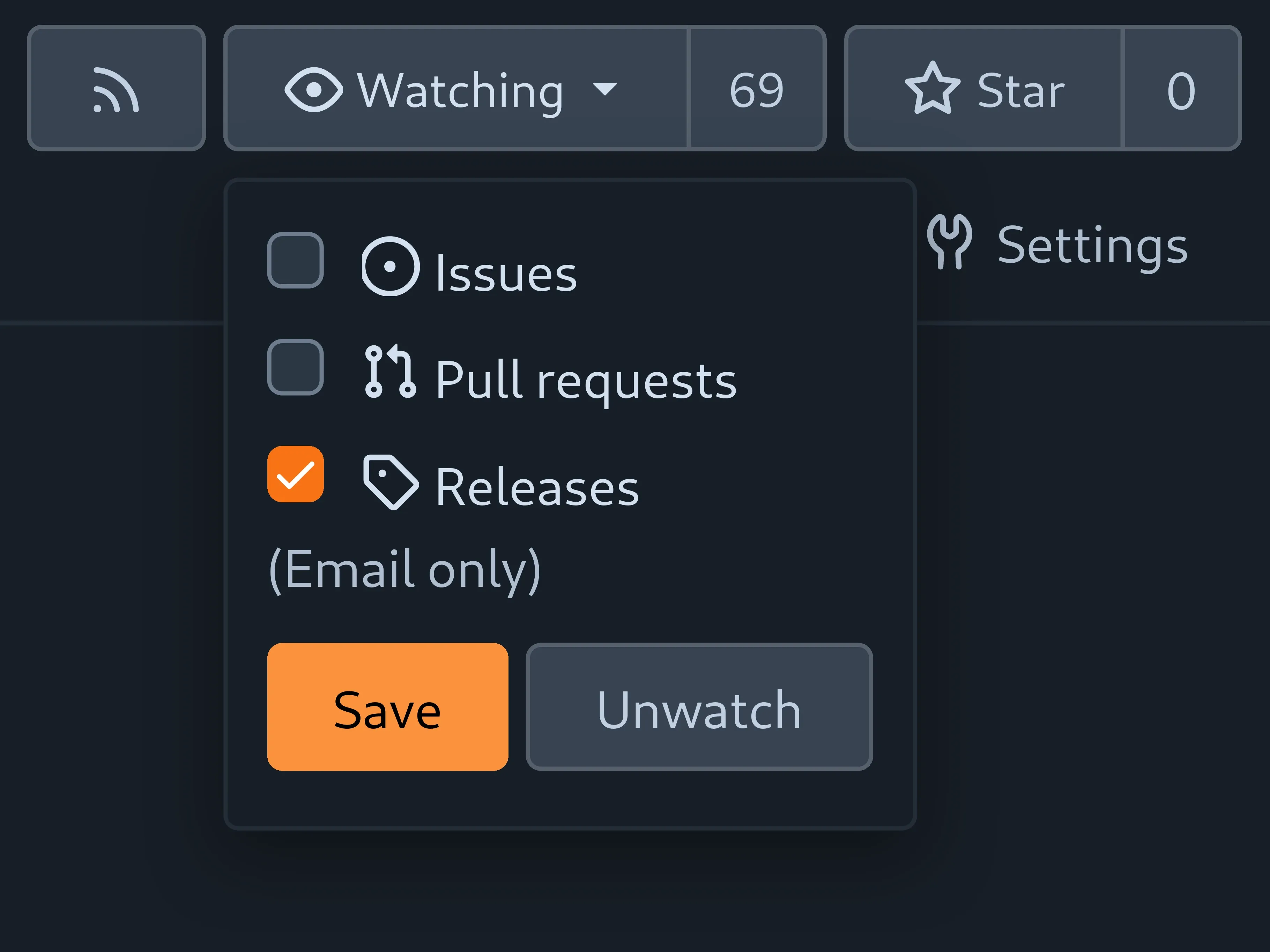
Forgejo makes major strides towards improving its notifications. Now users may select what parts of a repo to receive notifications from! For now, there are three categories: Issues, Pull requests, and Releases. However, a reworked notification backend paves the way for further granularity. Forgejo wants to put users in control of their notifications without overwhelming them with options. If you have ideas or opinions on how that control should work, join the discussion in the issues.
Repository migration progress
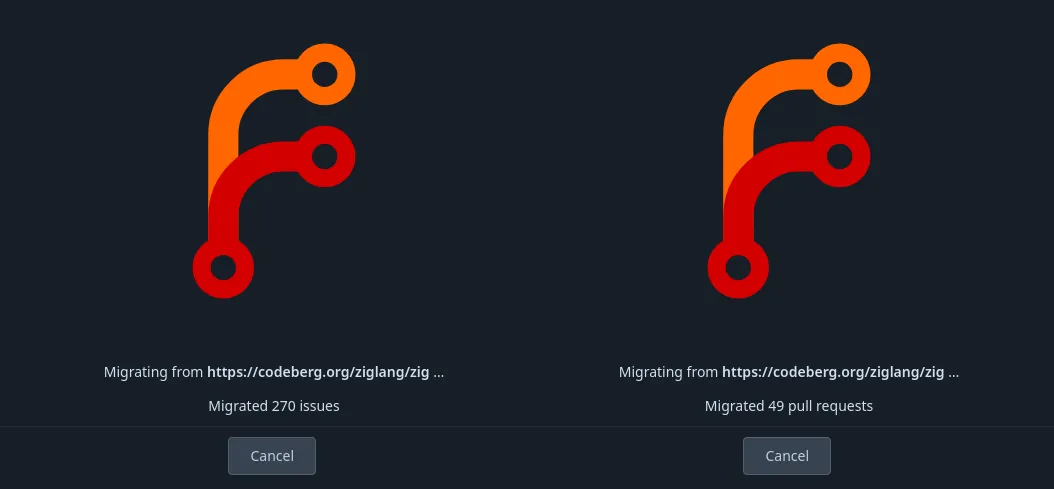
The repository migration screen now shows the progress of migrations. It provides the progress of migrated issues and pull requests from the source in batches. This allows to verify that long-running migrations are not stuck.
The default batch size is 45, which is a minimum amount of items for progress to be displayed.
Downsized avatar variants
Two downscaled avatar variants are now generated and served instead of the large primary one in all places where full size isn’t required, decreasing bandwidth usage and improving loading speeds.
Easier way to add team members
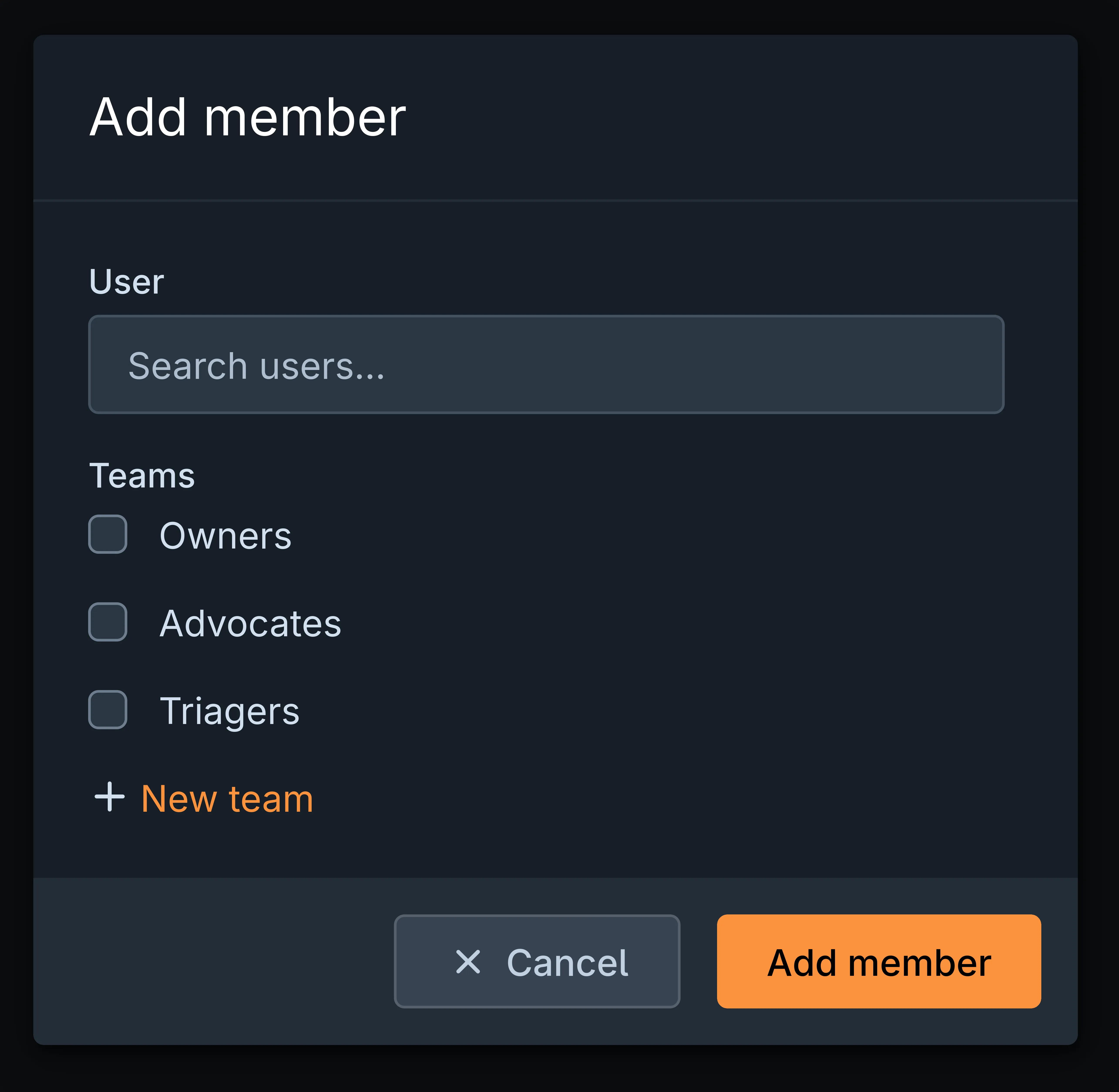
Adding members to organizations became easier thanks to a dialog reachable directly on the list of organization members. This dialog also lets you add the new member to multiple teams of your organization in one go.
Consistency check of incoming objects
Git is now configured to check for various inconsistencies in incoming objects to reject them and prevent the repository from getting into an inconsistent or corrupt state.
Prevent Git hook examples in repositories
Forgejo no longer populates Git’s example hook files on backend repositories. Additionally, instance-wide Git hooks are now stored in a centralized location instead of being duplicated in each repository. Combined, these changes save about 20 KiB of storage per repository. It adds up on large deployments!
Example and duplicated automatically generated files can be deleted from the existing repositories following the upgrade guide.
Repository units hint
A hint about adding available repository units was initially added in Forgejo v7.0.0. However, because of a bug, it was not displayed to newly registered users, only to users who existed before the instance upgrade to Forgejo v7.0.0. This bug was now fixed.
While this hint is intended for beginners, more experienced users may not want it. It is now easier to discover where these hints can be disabled.
Note that the “Enable more” hint is only shown when some repository units are disabled. By default, all units are enabled, so it only appears when some units were explicitly disabled by instance administrators or repository owners.
Pull requests improvements
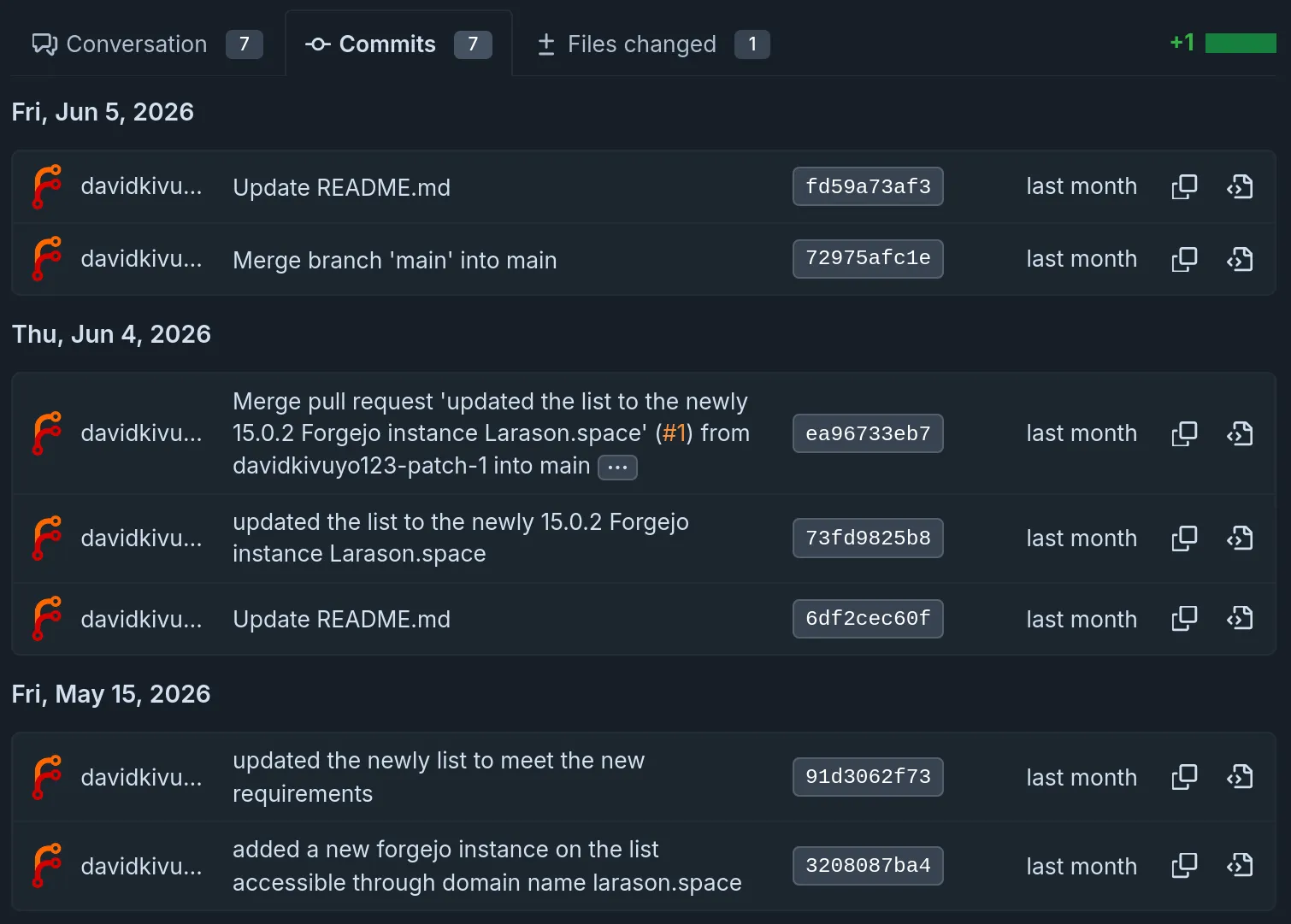
Redesigned commits view
The commit list got a new layout. It’s cleaner, easier to read, and responds to different screen sizes much better.
For now, this new layout is only used on pull request pages, but the plan is to gradually roll it out to other pages that have a commit list.
Multi-line reviews
Forgejo now features the ability to add pull request review comments on multiple lines of text changed in a PR. To comment on several lines at once, hold Shift, press the plus button next to the first line of the range, and drag down to its last line before releasing. The highlighted lines are then attached to a single comment.
Review comment placement
Frustrating experiences of placing code review comments in pull requests and having them appear with the wrong associated diff, no associated diff at all, or in the wrong location in the UI have been resolved in Forgejo 16.
The major issues addressed include:
- Forgejo uses
git blamewhen a comment is placed in a pull request review in order to identify the commit that introduced the line of code being commented on. This allows the comment to be displayed on any commit that is viewed on the pull request (if relevant), even if the comment was originally entered on a later commit. However, when the line of code moved in a later commit, the comment would be placed incorrectly. The introduction of an internalgit blame --reverseto track the change to its current location addressed this issue. - Improved the implementation of placing comments based on the code being viewed by the reviewer, rather than the current HEAD of the pull request. In both viewing the entire pull request and in viewing individual commits, UI bugs caused what was being viewed to be incorrectly tracked.
- Comments on removed lines of code could not perform the
git blameoperation because the line of code was no longer present in the commits, and instead were tracked with the exact line of code that was commented upon. This prevented these comments from being displayed correctly when later commits in the pull request moved lines of code in the file. Comments now usegit blame --reverseto identify when the line of code was removed, verify that the line of code is still removed in the current diff at the same location, and then place the comment correctly (or mark it out-of-date).
More technical information for the curious can be found in these pull requests:
- forgejo!12015: fix: relocate PR review comments using
git blame --reverse, improving comment placement - forgejo!12054: fix: mark code comments as Outdated based upon line-of-code existence in current PR commit
- forgejo!12107: fix: when reviewing in PRs, make comments relative to viewed base & head, not just viewed head
- forgejo!12055: fix: when reviewing in PRs, make comments relative to the visible code’s commit
- forgejo!12092: fix: display code comments on removed lines-of-code to correct locations in PR view
Forgejo actions improvements
Manual workflow run prioritization
Forgejo Actions runs workflows in the order they are triggered. Starting with Forgejo v16, it is possible to manually mark individual workflow runs as prioritized. Forgejo Actions executes prioritized workflow runs before all others. We like to refine the capability in future Forgejo versions. Please try the functionality and report back.
Authorized Integrations
In Forgejo v15, Forgejo Actions was given the ability to generate JWTs that external systems can validate for authentication. Forgejo v16 brings the opposite side of that capability: Authorized Integrations, allowing Forgejo to authenticate API and Git access using JWTs.
Authorized Integrations can be accessed from local Forgejo Actions, or can be configured with a set of rules to allow an arbitrary JWT to be validated by Forgejo.
This capability serves as an alternative to implementing permissions: declarations within Forgejo Actions. Authorized Integrations can be used to escalate past the typical permissions that ${{ forgejo.token }} provides, without having to configure (and rotate in the future) a secret access token, without introducing the risky capability for workflow authors to grant themselves unexpected permissions, and with the ability to work across multiple Forgejo repositories.
An external system meeting Forgejo’s technical requirements can also directly access Forgejo APIs and Git repositories through a user’s configured Authorized Integration, without configuring any static secrets between systems. Examples of such systems include: Amazon Web Services, GitHub Actions, or GitLab CI/CD
Other notable enhancements
- forgejo!13030: Evaluation of conditions in Forgejo: If possible, Forgejo evaluates
ifconditions directly without dispatching a job to Forgejo Runner. That speeds up workflow execution. - forgejo!12478: Removal of old workflow runs: Completed workflow runs including logs and artefacts can be removed either using the UI or the HTTP API. For security reasons, only a repository administrator or an access token with
write:repositorypermissions can remove runs. - Workflow syntax enhancements:
cronexpressions support GitHub’s syntax for specifying a timezone in addition to Forgejo’s existing syntax (cron: CRON_TZ=Europe/Berlin 0 10 * * *). - forgejo!12606: Skipped checks are marked as skipped: Previous versions of Forgejo would mark them as succeeded.
API improvements
Actions-related API additions
The highly requested endpoints for obtaining workflow logs have been added. They make it possible to obtain the logs of an entire workflow run or individual jobs.
A number of endpoints were exposed for interacting with artifacts. They can be listed, downloaded, and deleted. Documented endpoints for uploading artefacts are on the project’s to-do list.
An endpoint for cancelling individual workflow runs has been added, too.
Another addition is /actions/run. It provides information about the workflow run that an automatic token (FORGEJO_TOKEN) is for.
Other API additions
- forgejo!12633: Organization model, returned by various endpoints, now includes creation time
- forgejo!12104: When searching pull requests, it is now possible to filter by names of their base and head branches
- forgejo!12323: Instance administrators now can manage users’ access tokens: list, issue and delete
- forgejo!12091: When listing users, instance administrators now can filter by 2FA status
Release schedule and Long Term Support
Based on the release schedule, major releases are published every three months. Patch releases are published more frequently, depending on the severity of the bug or security fixes they contain. Forgejo v16.0 is a non-LTS release. It will be supported until 29 October 2026.
| Version | Release date | End Of Life |
|---|---|---|
| 11.0 (LTS) | 16 April 2025 | 16 July 2026 |
| 15.0 (LTS) | 16 April 2026 | 15 July 2027 |
| 16.0 | 16 July 2026 | 29 October 2026 |
| 17.0 | 15 October 2026 | 28 January 2027 |
16.0-test daily releases
Releases are built daily from the latest changes found in the v16.0/forgejo development branch. They are deployed to the https://v16.next.forgejo.org instance for manual verification in case a bug fix is of particular interest ahead of the next patch release. It can also be installed locally with:
Their names are staying the same, but they are replaced by new builds every day.
Get Forgejo v16.0
See the download page for instructions on how to install Forgejo.
Upgrading
Carefully read the breaking changes section of the release notes.
The actual upgrade process is as simple as replacing the binary or container image
with the corresponding Forgejo binary
or container image.
If you’re using the container images, you can use the
16.0 tag
to stay up to date with the latest 16.0.Y patch release automatically.
Make sure to check the Forgejo upgrade documentation for recommendations on how to properly back up your instance before the upgrade.
Contribute to Forgejo
If you have any feedback or suggestions for Forgejo, do not hold back; it is also your project. Open an issue in the issue tracker for feature requests or bug reports, reach out on the Fediverse, or drop into the Matrix space (main chat room) and say hi!
Donate
Forgejo is proud to be funded transparently. Additionally, it accepts donations through Liberapay. It is also possible to donate to Codeberg e.V. in case the Liberapay option does not work out for you, and part of the funding is used to compensate for work on Forgejo.
However, the Liberapay team allows for money to go directly to developers without a round-trip to Codeberg. Additionally, Liberapay allows for a steady and reliable funding stream next to other options, a crucial aspect for the project. The distribution of funds through Liberapay is transparently controlled using the decision-making process, and Forgejo contributors are encouraged to consider applying to benefit from this funding opportunity.
Thank you for using Forgejo and considering a donation, if your financial situation allows.