
Forgejo Runner Registration
Forgejo Runner requires a uuid and token to connect to Forgejo. These values act as a username and password for
identifying and authenticating the connection. There are three ways to obtain them:
- Interactive registration in Forgejo (recommended)
- Using Forgejo’s HTTP API
- Offline registration using Forgejo’s command line utility
Interactive registration
Forgejo Runner needs to be registered with Forgejo to execute jobs. Within Forgejo, a user can register a new runner
four different locations, which vary in which workflows will executed on the runner:
- A system administrator can create a runner at
/admin/actions/runners, which will execute workflows from all repositories on the Forgejo instance. - An organization administrator can create a runner at
/org/{org}/settings/actions/runnerswhich will execute workflows from all the repositories within the organization. - A user can create a runner at
/user/settings/actions/runnerswhich will execute workflows from all repositories owned by the user. - A repository administrator can create a runner at
/{owner}/{repository}/settings/actions/runnerswhich will execute workflows from the single repository.
Each of these pages will display any existing runners that are capable of executing jobs, including runners from higher level registrations. For example, when viewing the runner list in a repository, that will include any runners registered with the organization that owns the repository, and any runners registered at the system administrator level.
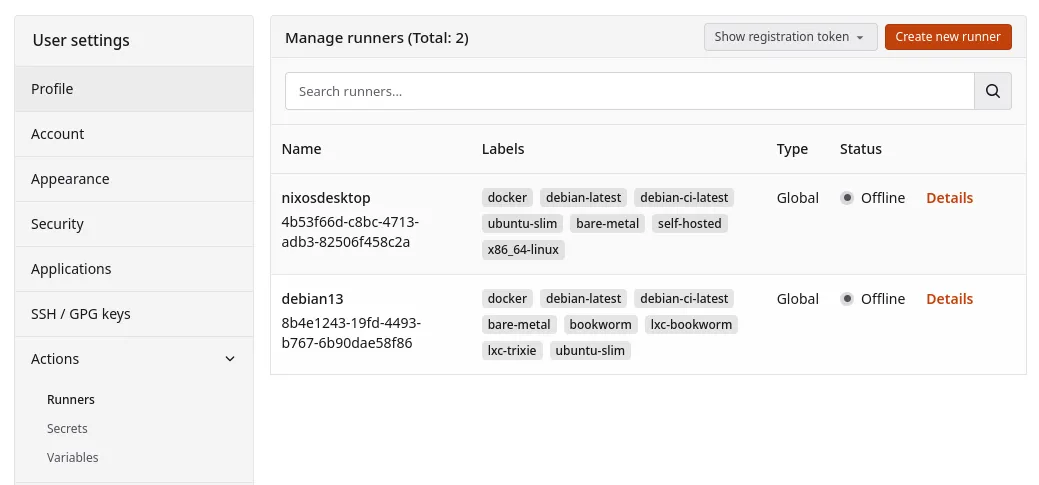
The Create new runner button opens a dialog to enter a name and description for the runner:
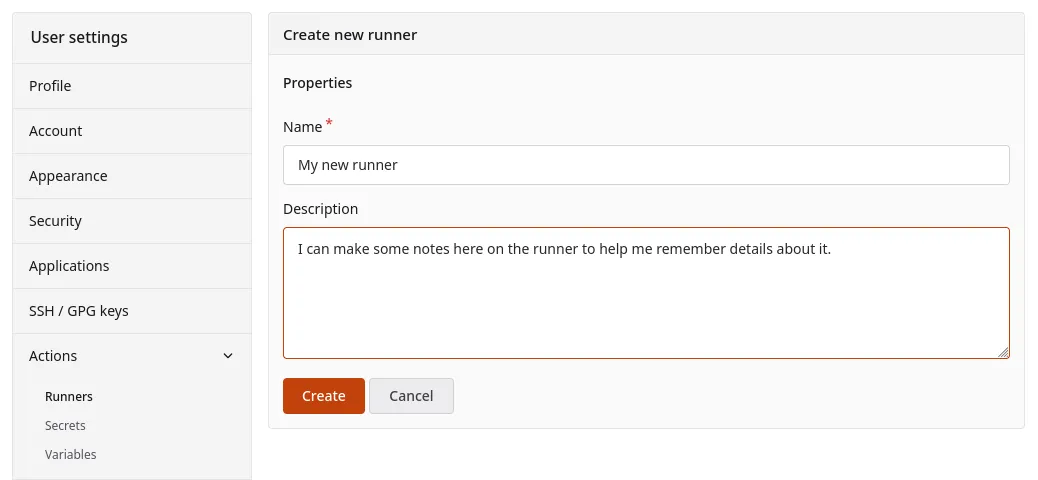
After hitting the Create button, a unique identifier (UUID) and a confidential secret (Token) will be displayed for
the new runner.
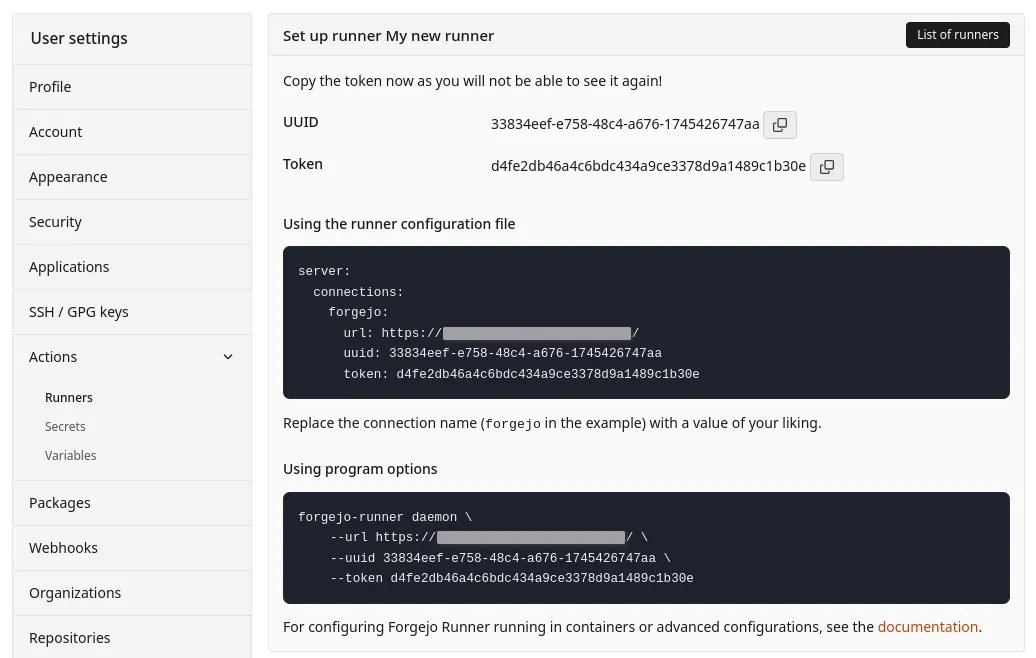
The displayed configuration should be copied into the Forgejo Runner configuration file, in the server section. The
default configuration file (which can be generated if absent) has an empty
server section which contains only comments about the intended format. For example, to finish this configuration based
upon the UI values:
# ... the rest of the config file ...
host:
  # The parent directory of a job's working directory.
  # If it's empty, $HOME/.cache/act/ will be used.
  workdir_parent:

server:
  connections:
    forgejo:
      url: https://example.com/
      uuid: 33834eef-e758-48c4-a676-1745426747aa
      token: d4fe2db46a4c6bdc434a9ce3378d9a1489c1b30e
The registration process can be repeated multiple times to connect one Forgejo Runner to different Forgejo instances,
or to different organizations, users, or repositories within a single Forgejo instance. In this case, multiple
connections would end up in the configuration file, for example:
# ... the rest of the config file ...

server:
  connections:
    company-org1: # keys must be unique, but have no meaning
      url: https://company-forgejo.example.com/
      uuid: 33834eef-e758-48c4-a676-1745426747aa
      token: d4fe2db46a4c6bdc434a9ce3378d9a1489c1b30e
    my-org2:
      url: https://my-forgejo.example.org/
      uuid: f7fb6f55-7140-44b6-893a-37ceae0df435
      token: 111b5aca20e64c290d639987c9a401377a2e4253
Offline registration
When Infrastructure as Code (Ansible, kubernetes, etc.) is used to deploy and configure both Forgejo and the Forgejo runner, it may be more convenient for it to generate a secret and share it with both. This method of registration is not applicable for hosted services like Codeberg as it requires system administrator access to the Forgejo instance.
The forgejo forgejo-cli actions register --secret <secret> subcommand can be used to register the runner with the
Forgejo instance. First, generate a 40-character long string of hexadecimal numbers.
On the machine running Forgejo:
$ forgejo forgejo-cli actions register --name runner-name --scope myorganization \
    --secret 7c31591e8b67225a116d4a4519ea8e507e08f71f
37633331-3539-3165-3862-363732323561
And on the Forgejo Runner instance, add the remote server address, uuid, and token to the configuration file:
# ... the rest of the config file ...

server:
  connections:
    forgejo:
      url: https://example.com/
      uuid: 37633331-3539-3165-3862-363732323561
      token: 7c31591e8b67225a116d4a4519ea8e507e08f71f
The 40-character secret is a combination of an identifier and a secret value: the first 16 characters will be used as an identifier for the runner, while the rest is the actual secret. It is possible to update the secret of an existing runner by running the command again on the Forgejo machine, with the last 24 characters updated.
For instance, the command below would change the secret set by the previous command:
$ forgejo forgejo-cli actions register --name runner-name --scope myorganization \
    --secret 7c31591e8b67225a84e8e06633b9578e793664c3
#            ^^^^^^^^^^^^^^^^ This part is identical