Development version
This documentation is for a Forgejo version which is not yet released.
To read the documentation for the released version of Forgejo, navigate to the latest version.
Service Message
The service message feature is intended for admins of instances that require their users to consent to some kind of agreement before continuing.
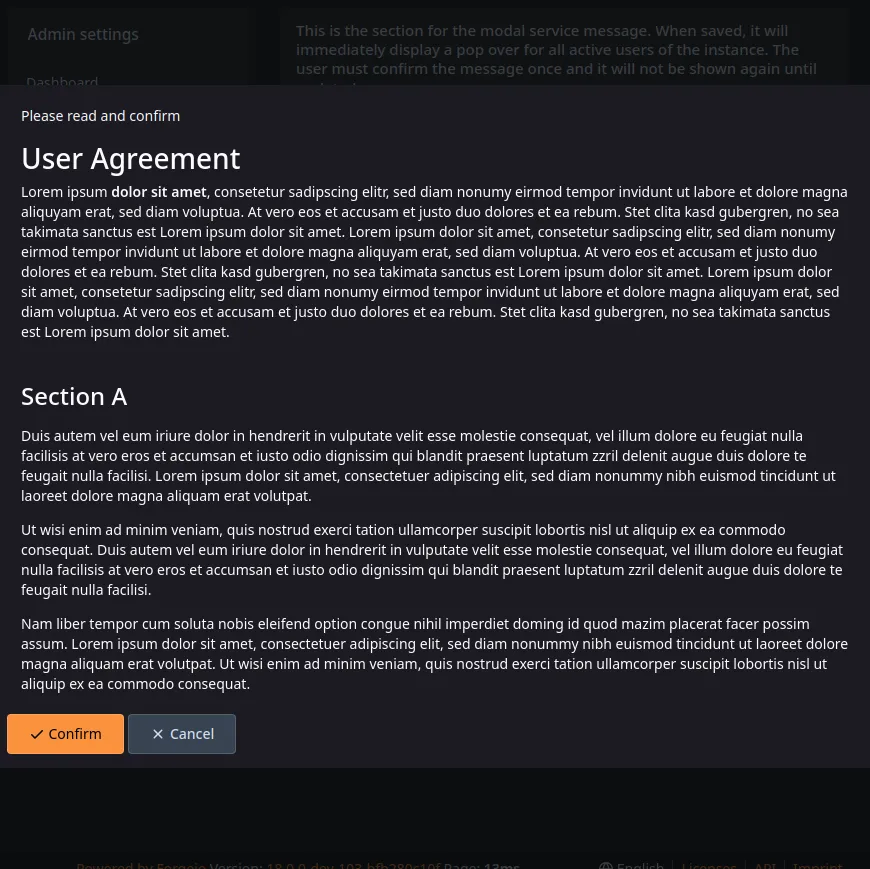
Setting Up & Previewing a Service Message
- Navigate to
Site Administration, then clickService messageon the left - Add a title and a text, the text field supports markdown formatting
- Click the
Previewbutton - The rendered service message will display like it would be displayed to the users
- Click
Close PreviewandSavewhen ready and the service message will be shown to all logged in users immediately, including you and all users who log in at a later time - Consent will be saved so the message does not show up again & disagreeing will send the user to logout
Updating a Service Message
You can change the title and the text at any time and click Save again to display the updated service message.
Deleting a Service Message
Just hit the Delete button to delete.